To all my US readers out there, Happy Turkey Day! I have a couple of posts comin' down the pipeline including a recap of my past few weeks with Windows 7, a cell phone review (UTStarcom Shuttle for Virgin Mobile USA), and a real-world review of the Sony A200 DSLR camera. But today is dedicated to the grand tradition of putting on some pounds and fighting the turkey-induced nap! Gobble gobble!

11.27.2008
11.19.2008
Zune 3.1
Last week, I officially ended the use of my 120GB iPod Classic. I ended up selling it to someone who could use it more than I, and I'm okay with that. I'm back to using a Zune again, though this time an 8GB one. Yes, I could go back to the 80GB, but I want something that fits in my pocket completely comfortably. It's also forced me to whittle down my music collection to stuff that I really want to take with me, as opposed to everything I have. The Zune makes it really easy to "vote songs off" by using a simple rating system. Anything that I rate "broken hearted" automatically gets pulled off the Zune the next time I sync, making space for other songs that I might want to listen too. Yes, with the iPod, I could create a Smart Playlist that only syncs songs of certain ratings, but this is much simpler and more intuitive. The move from Leopard to Windows 7 (watch for an update on that soon) also means that I have wifi-syncing capabilities again (something that was broken while using VMWare Fusion under Leopard). While not as fast as USB syncing, it is REALLY convenient. Also back is the Zune Pass, allowing me to download any music I want, and opening up the possibilities of The Social. Picks and Channels give me weekly updated plalists that expose me to new music.
Yesterday, Microsoft suprised us all with a .1 update that, on the surface, added some more games, but also improved syncing of media between the desktop software and the player. I'm hoping this means that resume points in videos will now sync; I've been watching movies on my Zune 8 lately, and I noticed that when going to the desktop and watching the video, it doesn't resume (like iTunes and iPods do). Here's Microsoft's official listing, care of Zune Insider:
"Starting today, Zune gets a little update which will bring a handful of free games, a refresh to Zune Social and incremental improvements to the software.
On the games front, we are giving away three new additions, Checkers, Sudoku and Space Battle, plus a new multiplayer mode and single player difficulty levels for Texas Hold’em.
The team also did some great work the Zune Social visual refresh to make it easier to navigate, as well as adding a new feature called “like minded listeners,” which will let you see how compatible your music tastes are with other listeners and friends.
On the more techie side we focused on improving overall stability and performance in the Zune PC software and device firmware, such as improved play count reporting and content synchronization between the Zune software and the Zune device."
They also tossed up a few screens of the new games:
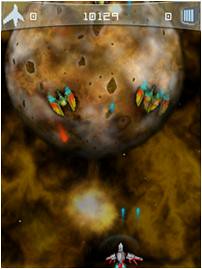
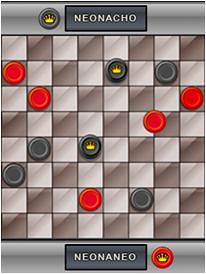
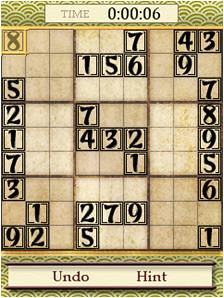
While I can't speak for Soduku (I've never played it, IRL or on the Zune) or Checkers, Space Battle is insanely fun. If memory serves me correctly, this is the game that was shown way back when Games for Zune was announced, and a game I've been waiting for. Anyway, give it all a check out if you have a Zune and haven't updated yet!
Along with this announcement, Microsoft also announced a price drop on the flash Zunes (4, 8, and 16 modesl) along with most accessories. It looks like they might be taking a serous aim at Apple this holiday season!
EDIT:
Microsoft today announced that Zune Pass subscribers will now get 10 free songs a month to keep forever! If you have a Zune, why would you NOT be a Zune Pass subscriber now? It greatly enhances the Zune, and you get free music to keep, even if you cancel your membership! Microsoft is really turning up the heat, and now with 90% (according to them) of their Marketplace library being DRM free MP3 files, they are really positioning themselves to take on the iPod. So let's recap: in the past few days, Microsoft has: A) updated the firmware for ALL Zunes (even back to first generation 30s), B) dropped the prices on the flash Zunes (4, 8, and 16 models) and most accesories and, C) added incredible value to the Zune Pass subscription. Apple, are you taking notes? If Microsoft ever makes the Zune Mac (and possibly Linux) compatible, Apple might have a serious problem on their hands...
11.07.2008
Windows 7
Tuesday marked not only a historic day for my country, but also the start of what has been a surprisingly wonderful relationship. I wiped my laptop (after creating a perfect copy of my hard drive with Mac OS X Leopard with SuperDuper!) and installed the pre-beta of Windows 7. Now, I'm admittedly a Mac fanboy, and while I've used Windows, with varying degrees of success, in the past, I was not expecting to play with Windows 7 for more than a few hours. I intended to restore my laptop with Leopard while I was sleeping that night. Well, I'm still in Windows. And for all the right reasons.
While an early, pre-beta build, Windows 7 has been extremely stable, fast, and usable for me. I only hit one compatibility issue, ironically while trying to install Microsoft's OneCare anti-virus suite. Other than that, I've installed Office 2007, Photoshop CS4, Lightroom 2.1, Firefox, Trillian Astra, iTunes, and a slew of other programs with no problem. I have yet to have a crash, and Windows 7 is very noticeably faster than Vista, Leopard, and almost even XP!

The UI has undergone some changes since Vista, most notably with the task bar. The task bar works more like a dock now, with only icons residing there; no more text labels for programs. While that might sound like it could get confusing, the genius is that no matter how many windows of a particular program you are running, only one icon shows. As you can see above, multiple "blades" next to an icon represent the number of open windows. Hovering over the icon pops up real-time thumbnails of each window that are selectable. Hovering over each window preview produces a small red X in the right corner, used to close the window without selecting it. This has vastly sped up program switching for me, which, in turn, has increased my productivity.

Aero has undergone a slight tweaking, making it less resource-intensive (translating to better battery life on a laptop) and looking a bit smoother. Personally, I expect it to be visually tweaked some more to match the new task bar, but I could be wrong. Also receiving some MUCH overdue "tweaking" (more of an overhaul), are Paint and Wordpad. Paint actually becomes a usable program for the first time since it's inception; I used it to do the screenshot crops for this article. In addition to retaining it's speed and lightness, it now has adopted the Ribbon interface from Office 2007 along with an arsenal of tools, making it my new choice for quick image edits!

The dreaded UAC (User Account Control) has been toned down so it's not nearly as intrusive as it was in Vista, while still gently providing the guidance needed to keep the user secure.
These are just a few of the things that I've come across that I've found notable. As time goes on, I'll post more about my experiences with Windows 7. I've read several reports out there saying it's very much a pre-beta, not yet near ready to ship. I contend that it could ship very soon (even though it's not going to) for the average user. It's at least as stable as Vista was when it shipped, if not more. It's my day-to-day system for the foreseeable future.
10.24.2008
Quick Tip: Aperture and Your iPod
As the launch of Liphart Studios approaches (my first official shoot is tomorrow), I've faced a serious dilema; hard disk space. I have a 120 GB internal hard drive (down to 5 GB free), and an external 120 GB drive for Time Machine. I could have wiped the external and used that for photo storage, but I knew that the second I did that, I'd need that backup. So I researched getting new hard drives, but the money just wasn't there. The other night, a huge light bulb went off over my head. My iPod! For years now, you've been able to use the iPod as a general storage device, just like an external hard drive, by enabling disc use. I knew this, and I've used it on and off in the past, but hadn't thought about it since I had my iPod Mini. Anyway, by putting the Aperture Library on my iPod, I have 50 GB of free space to play with for photos. And it freed up some space on my lappy too. Here's how to do it:
1) Enable disc use of your iPod through iTunes (in Other Options, under the Summary tab of your iPod in iTunes).
2) Move your Aperture Library to the iPod location of your choice (I chose Photos).
3) Move your computer's copy of the Aperture Library somewhere as a backup.
4) Load Aperture, and if not prompted to locate your library, go to Preferences/General/Library Location and point it to the library on your iPod.
That's it! Now you have a portable Aperture Library. The downside is that you have to have your iPod plugged in to use Aperture, but if you've got a bunch of free space on your iPod, you might as well use it! Also, if you lose your iPod, you lose your photographs. Always keep a backup! This tip will also work with iPhoto, and I'm sure other programs as well.
10.07.2008
Mini-Review: Sony A200 DSLR
 So I finally got my camera. I had to work with a tight budget, and I ultimately went with the Sony A200. It's very lightweight, has a great interface (even for someone coming off of Canons for the past 2 years), and is pretty fast for it's price point. That price point being the $500 entry-level. For the cost, you don't get a lot of features, and indeed, there are flaws. The A200's flaw lies in it's noise levels (and bad noise reduction) at higher ISOs. Going over ISO 800 introduces more noise than one would expect, and the noise reduction causes smearing, especially when you get to 1600 or 3200. (Shooting RAW helps, but does not eliminative, this issue.) It does produce very crisp and clear photographs, with reproduction (at lower ISOs) greater than one would expect of a $500 DSLR. It also comes with a kit lens that ranges 18-70mm, beyond the typical kit lens that only reaches 55mm. This is great for shooting portraits. I shoot exclusively in RAW, and the results are wonderful. It only does 3 frames per second (up to 6 frames total RAW), but I find this to be adequate even for animal shots so far.
 I'm still in the "testing" phase, as I've not had my own DSLR to go wild with before. I've taken a few cool shots, and a lot of really bad ones! The shot in this post was taken earlier this afternoon on my property with the A200. Of course, I processed it a bit to get that result, but you can still see great amounts of detail in the larger size version, which can be seen here if you have a deviantART account. I've also played around with making some HDR (High Dynamic Range) pictures, and the results have been pretty cool. I'm going to add a sidebar here on the blog so you can track my recent photos and other artwork (for those interested) on my deviantART account . I did have to laugh a bit at the included software; Sony knows that Mac users already have a management system built in (iPhoto), so the included software is very simple RAW adjustment and conversion tools, nothing more. I installed the stuff, but I have yet to actually use it since I use Aperture. I don't foresee the need for it, but you never know. At any rate, don't expect this blog to become a photo-journal; I'm going to keep it tech based here. I just wanted to post a very short review of the A200. And yes, I will probably post about all the cool gadgets I get to go with the camera.
9.27.2008
Bose Audio
Tonight, I give you reviews of two Bose products: the Companion 2 Series II desktop speakers, and the In-Ear Headphones. Both have their ups and downs, so let's get to it:
Companion 2 Series II Speakers:

In-Ear Headphones:

Companion 2 Series II Speakers:

This paired set of speakers is great for the desktop, not requiring even floor space for a subwoofer. Sound is very clear, with excellent bass response, given that there is no subwoofer. These clearly demonstrate to me what I saw on commercials as a kid when they advertised their clock radios; they can give rich, full sound out of small speakers. They have a second line-in on the rear of the right speaker with RCA jacks, so you can add another sound source. There is also a headphone jack on the front of the right speaker. They're not cheap; we're talking $100, but they are fairly portable, and sound awesome.
In-Ear Headphones:

These took a bit of getting used to for me. I'm more of a drill-it-into-my-ear-canal headphone kinda guy, so it took me a day or so to let these sit in the ear like they're supposed to. The sound is awesome, with great bass response, though I find the noise-canceling feature to be negated by the fact that these don't go into the ear canal. Ambient sound goes right around them. Again, we're talking $100, though in this price range, I'd wager they might be unmatched. The sound is very deep and rich, and once I got used to them, they were very comfortable. They do come with a great lanyard that keeps the headphones around the neck; I LOVE this. I haven't tried the Shure headphones of the same price, so I can't give a comparison. I do think they'll take a hit when the new headphones are released from Apple, but we'll see. I do plan on picking those up, so I'll write a review when I do.
9.24.2008
The Switch
 So I landed an iPod Classic 120GB. No, I did not purchase it; I won it at a recent event. At any rate, I've decided to give it a go for a while against my Zune 80. I've been using it for a few days now, and I've got some thoughts on it:
Good:
1) I got the black one, and it's pretty slick looking. Years of design have leant the iPod a great, almost natural feel in the hand.
2) The screen is the same resolution as the Zune's, though smaller, so it has a higher pixel-density. This makes everything look gorgeous.
3) iTunes integration is a thing of beauty for me. But do I really need to touch on that?
Bad:
1) No WiFi. This may not seem like a big deal to those who have never had it, but it sucks. I really liked having Zune Marketplace available in the week that I was actively using it.
2) Channels and The Social. I know iTunes has Genius (which is pretty cool to create playlists), but to have a professional DJ create a list that changes and syncs every week is awesome. To have a list of similar listeners and friends that you can see what they're listening to is even more awesome.
3) No subscription. Zune Pass is awesome on more levels than one. WiFi Marketplace, Channels, and The Social are all fully accessible without even plugging in for one price! I really think Microsoft is doing the subscription thing the right way this time. Rhapsody, Napster, and others have all had only flagging success, but The Social takes things to a whole new level.
4) The interface. I really love the "Crossbar" interface the Zune has. It's just more intuitive, in my opinion.
And there are more differences, mostly minor, between the two that I'm not going to dig into. In the long run, I'm not sure which player I'll stick with. While I like the Zune a bit more, 10 GB of dedicated hard drive space for Windows just to use it sucks. It's very tempting to nuke that virtual machine and just use iTunes. Time will tell, as will I in a future blog post.
I can now actually say both players are really nice, and I personally think the Zune edges out the iPod due to it's integration of WiFi and the Zune Pass. That's pretty impressive for someone who's only been in an iPod-dominated marketplace for a few years. Will it kill the iPod? No. Being a little better than the iPod isn't good enough. You have to redefine the arena. And Apple already did that with the iPhone/touch. I hope Microsoft continues with the Zune as it is a great product, but I don't know if it'll garner the market traction before it gets the axe. The question is, how long will Microsoft give it, and how much market share is enough?
9.17.2008
Post 50: Zune 3.0 and VMWare Fusion 2.0
50?! Has it really been that many posts? Wow... I've got a double-post tonight: new versions of VMWare Fusion and Zune launched Monday night and Tuesday morning, respectively!
VMWare Fusion 2.0:
 As many of you know from reading my previous posts, I run Mac OS X Leopard (hacked to run on my PC laptop). I need Windows for one thing only: my Zune. I love my Zune 80, to the point that I have 10 GB allocated for my XP virtual machine JUST for Zune Desktop. Anyway, while waiting for Zune 3.0 (or Z3, from here on) to launch Monday night, VMWare updated Fusion to 2.0. What does this new version bring? I've noticed some performance upgrades, and it can mirror your user folders (desktop, music, movies, etc) in the Windows' My Documents folders. It also integrates further with Leopard. For example: I downloaded a WMV file with Safari, and it launched inside XP using Windows Media Player. I can also launch Mac Mail from within Internet Explorer if I click an email link. It's kinda nice. Now, Fusion still isn't anywhere near as fast as native Windows is, but for my use, it's fast enough. If I had more RAM or a faster processor, it'd be a whole lot faster, but Ruri (my laptop) has her limitations.
Zune 3.0
 I waited a week in high anticipation for Z3, and I was rewarded justly. The launch wasn't the smoothest thing ever; I was unable to purchase a Zune Pass until Tuesday afternoon due to Zune.net lot linking all of its pages properly. It was no MobileMe though. By Tuesday evening, most of the wrinkles were ironed out. Let's start with the Zune Desktop. What's new? Picks is Zune's answer the Genius in the new iTunes. It basically does the same thing as Genius in regards to finding new music. The Mix view of Now Playing is really cool; it lays out a stack of artists and albums that are like what you're listening to that you can visually click through. Channels are new too. With a Zune Pass, it'll download dynamic playlists and songs on a recurring basis for you. I have electronica, rock, and soundtracks channels set up for me. On to the Zune Player! Biggest new thing? WiFi Marketplace. You can now search, browse, purchase, and download music right from the player through WiFi, much like iPod touch or iPhone. Buy from FM is really cool too. The Zune has a built-in FM radio that can pick up track, album, and artist metadata from supported stations. You can queue up the song you're listening to to be purchased and downloaded when you're in WiFi coverage! I love it! Games are also new, but there are only 2 right now. While fun, they don't really blow me away. Also, support for Audible audiobooks has been added, though you have to download those with the Audible application, not Zune Marketplace. There's a few other little things too like the addition of a clock to the home screen, but nothing else big. Oh! Channels and Friends favorites can be updated over WiFi too! With a Zune Pass, this means I can browse and download unlimited songs over WiFi, not to mention have my Channels update without docking too! I wish podcasts could be, but hopefully they'll toss that into 3.5. It should be noted that Z3 is able to installed on ALL Zunes, even the first gen ones. I think that's huge, and it shows awesome support for early adopters. I know it's a pipe dream, but I really wish they'd roll out a Zune Desktop for Mac. You also still can't add art to video files still. See my last post for my tip on doing that. It's literally the only thing keeping Windows floating around on my laptop.
I also moved all of my media to my external hard drive Monday night, freeing up about 80 GB on my laptop to expand my XP virtual machine and improve overall performance. After the move, I formatted the laptop and reinstalled Leopard with a vanilla (as "unhacked" as possible) install to clear up some compatibility issues I was running into. It was a busy night! lol
VMWare Fusion 2.0:

Zune 3.0
 I waited a week in high anticipation for Z3, and I was rewarded justly. The launch wasn't the smoothest thing ever; I was unable to purchase a Zune Pass until Tuesday afternoon due to Zune.net lot linking all of its pages properly. It was no MobileMe though. By Tuesday evening, most of the wrinkles were ironed out. Let's start with the Zune Desktop. What's new? Picks is Zune's answer the Genius in the new iTunes. It basically does the same thing as Genius in regards to finding new music. The Mix view of Now Playing is really cool; it lays out a stack of artists and albums that are like what you're listening to that you can visually click through. Channels are new too. With a Zune Pass, it'll download dynamic playlists and songs on a recurring basis for you. I have electronica, rock, and soundtracks channels set up for me. On to the Zune Player! Biggest new thing? WiFi Marketplace. You can now search, browse, purchase, and download music right from the player through WiFi, much like iPod touch or iPhone. Buy from FM is really cool too. The Zune has a built-in FM radio that can pick up track, album, and artist metadata from supported stations. You can queue up the song you're listening to to be purchased and downloaded when you're in WiFi coverage! I love it! Games are also new, but there are only 2 right now. While fun, they don't really blow me away. Also, support for Audible audiobooks has been added, though you have to download those with the Audible application, not Zune Marketplace. There's a few other little things too like the addition of a clock to the home screen, but nothing else big. Oh! Channels and Friends favorites can be updated over WiFi too! With a Zune Pass, this means I can browse and download unlimited songs over WiFi, not to mention have my Channels update without docking too! I wish podcasts could be, but hopefully they'll toss that into 3.5. It should be noted that Z3 is able to installed on ALL Zunes, even the first gen ones. I think that's huge, and it shows awesome support for early adopters. I know it's a pipe dream, but I really wish they'd roll out a Zune Desktop for Mac. You also still can't add art to video files still. See my last post for my tip on doing that. It's literally the only thing keeping Windows floating around on my laptop.
I also moved all of my media to my external hard drive Monday night, freeing up about 80 GB on my laptop to expand my XP virtual machine and improve overall performance. After the move, I formatted the laptop and reinstalled Leopard with a vanilla (as "unhacked" as possible) install to clear up some compatibility issues I was running into. It was a busy night! lol
9.11.2008
Quick Zune Tips
So Zune 3.0 is coming out next week. Not only does this mean new Zunes, but it also means a software update for existing hardware out there. I thought I'd toss out a couple cool tips as we near the launch of Z3:
1) Adding Poster/Case Art to Videos: If you're like me, you've loaded up your Zune movies. Coming to Zune from an iPod touch, I really despised the fact that Zune Desktop doesn't allow you to modify the video file to add "album art". Ironically enough, iTunes is my work around. To do this, you'll need to add the video file to your iTunes library. This is easy enough if you aren't converting to WMV. I convert my files to MP4s or M4Vs with Quicktime, so it's compatible with both iTunes and Zune. Anyway, once imported, you can right click the file in iTunes and go to "Get Info". Go to Album Artwork and past in your artwork. As long as Zune Desktop is monitoring the folder the video file is in, it'll reflect the album artwork. From there, I right click the file in Zune Desktop, click "Edit", and input the type, release date, and summary info. It makes for a much nicer (and more "official") experience when using your Zune.
2) DVD Quality to TV: This tip actually made me feel stupid when I figured it out. Be warned, it'll make purchased videos take up more space! In Zune Desktop, go to Settings. Click on Device, and Conversion Settings. Under Video, click "Optimize video for TV output". This is turned off by default, and you'll notice a huge bump in quality when viewing your purchased videos on your TV.
And there you have it. A couple quick tips for working with video on your Zune. Perhaps 3.0 will allow you to natively add album art to videos, negating tip #1. We'll see Tuesday! If you have any other Zune tips, drop me a comment!
1) Adding Poster/Case Art to Videos: If you're like me, you've loaded up your Zune movies. Coming to Zune from an iPod touch, I really despised the fact that Zune Desktop doesn't allow you to modify the video file to add "album art". Ironically enough, iTunes is my work around. To do this, you'll need to add the video file to your iTunes library. This is easy enough if you aren't converting to WMV. I convert my files to MP4s or M4Vs with Quicktime, so it's compatible with both iTunes and Zune. Anyway, once imported, you can right click the file in iTunes and go to "Get Info". Go to Album Artwork and past in your artwork. As long as Zune Desktop is monitoring the folder the video file is in, it'll reflect the album artwork. From there, I right click the file in Zune Desktop, click "Edit", and input the type, release date, and summary info. It makes for a much nicer (and more "official") experience when using your Zune.
2) DVD Quality to TV: This tip actually made me feel stupid when I figured it out. Be warned, it'll make purchased videos take up more space! In Zune Desktop, go to Settings. Click on Device, and Conversion Settings. Under Video, click "Optimize video for TV output". This is turned off by default, and you'll notice a huge bump in quality when viewing your purchased videos on your TV.
And there you have it. A couple quick tips for working with video on your Zune. Perhaps 3.0 will allow you to natively add album art to videos, negating tip #1. We'll see Tuesday! If you have any other Zune tips, drop me a comment!
9.06.2008
Podcasts
In my job, I spend literally hours on end each day in the car. I long ago bored of listening to just music, and the radio in my car doesn't work, so I can't listen to talk radio. When I had my iPod touch, I listened to audiobooks. When I gave that up, I was using my Sansa Connect, which couldn't listen to audiobooks. Upon getting my Zune 80 a few months ago, I decided to give podcasts a go. The Zune software made it easy to find, add, and manage podcasts, and I found a couple that sounded good. I started with the Tech Guy netcast, with Leo Laporte, and the ForceCast. I was hooked. I currently listen to 21 podcasts! And yes, I spend enough time in the car to keep current on all of them.
So what is a podcast? Think of it as a recorded talk radio show centered around a specific genre. The shortest ones I listen to are 15 minutes long, while the longest can be upwards of two and a half hours. Mine primarily center around technology (go figure) and Star Wars (I am a dork, after all). I also have several horse-related shows in there too. But you can find podcasts ranging from childcare, to cooking, to security, and everything in between. I just came across a hospital one and a philosophy podcast. It's awesome, and a great way to stay current with news and knowledge. And you're not limited to audio; there are plenty of video podcasts out there too. I subscribe to several G4TV podcasts that highlight shows that I don't get to watch (since I don't get G4). Podcasts auto-update, so you get new stuff every time you sync. They require no maintenance beyond adding, and perhaps removing, the podcast.
Podcasts (or netcasts, as they're called on the TWiT network) have really made my commute an enjoyable part of my job. I actually look forward to longer rides now, just so I can listen to more podcasts. If you've never listened to a podcast, give it a go. Jump into iTunes (or whatever you media management software) and find the podcast section. Add a couple, and give it a week to see how it all works. They require no maintenance beyond adding, and perhaps removing, the podcast.
If you listen to podcasts, which ones are your favorite?
So what is a podcast? Think of it as a recorded talk radio show centered around a specific genre. The shortest ones I listen to are 15 minutes long, while the longest can be upwards of two and a half hours. Mine primarily center around technology (go figure) and Star Wars (I am a dork, after all). I also have several horse-related shows in there too. But you can find podcasts ranging from childcare, to cooking, to security, and everything in between. I just came across a hospital one and a philosophy podcast. It's awesome, and a great way to stay current with news and knowledge. And you're not limited to audio; there are plenty of video podcasts out there too. I subscribe to several G4TV podcasts that highlight shows that I don't get to watch (since I don't get G4). Podcasts auto-update, so you get new stuff every time you sync. They require no maintenance beyond adding, and perhaps removing, the podcast.
Podcasts (or netcasts, as they're called on the TWiT network) have really made my commute an enjoyable part of my job. I actually look forward to longer rides now, just so I can listen to more podcasts. If you've never listened to a podcast, give it a go. Jump into iTunes (or whatever you media management software) and find the podcast section. Add a couple, and give it a week to see how it all works. They require no maintenance beyond adding, and perhaps removing, the podcast.
If you listen to podcasts, which ones are your favorite?
Subscribe to:
Posts (Atom)